Product details
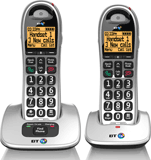
Cordless telephone
- Easy to read 1.8" full graphic dot-matrix display with amber backlight
- Hearing aid compatible with Amplify button to boost volume when you need it
- Avoid Nuisance or Unwanted Calls with options to block calls by specific numbers or certain call types*
- Handsfree speaker
- Save up to 100 contacts that will automatically synchronise between handsets (twin pack or more required for contact synchronisation)
- Available in single and twin packs
- Up to 300m range
- Up to 16 hours talk and 180 hours standby time
* You need to have a Caller Display service from your network provider to block nuisance calls and for Visual Voicemail feature. Charges may apply.
Documents
 You will need Adobe Reader to view PDF documents
Product helpdesk information
If your phone is within warranty:
By phone: 0800 145 6789
Monday to Friday 9.00 am to 5.30 pm, Saturday 9 am to 2 pm
By email: Click here for email support
If your product is out of warranty, contact BT's recommended agent
By phone: 0800 980 8999
Spares information
Replacement parts, including batteries, line cords, additional handsets, etc, are available from BT's recommended agent on 0800 980 8999.
Troubleshooting tips
- Why can't I make or receive telephone calls?
- Why do the batteries keep running low?
- Why don't I seem to get a very good range?
- Why does my handset screen continually display 'Searching', 'Base' or 'Range out'?
- Why does my handset screen continually display 'Register'?
- Why doesn't my handset ring?
- Why can't I use another type of BT cordless handset with my existing base?
- Why am I receiving interference or noise on my phone?
- Why are all my incoming calls too quiet?
- Why is my keypad not responding when I press a button?
- Why is my Caller Display not working?
- Why can I hear callers, but they can't hear me?
- Why can't I send or receive text messages?
- Why wasn't a full user guide provided?